Linux distributions typically release with some hand-picked version of the Linux kernel that is several months behind upstream kernel development. That kernel code base is kept as the foundation of the release and will only receive minor updates during its lifetime. Those updates are mostly bug fixes and do not add new features or drivers to the kernel.
This approach ensures the stability of the system until the next release, as the kernel will not drastically change behaviour with day-to-day updates. On the other hand, receiving the most recent fixes for security vulnerabilities requires extra work from maintainers of the distribution in backporting the corresponding patches from the most recent kernel version to the version used in their distro.
The usual disclosure timeline of 90 days for security vulnerabilities allows enough time to maintainers to backport, package and release kernel fixes. However, the recent influx of exploits published for the Linux kernel is stressing this system, with publications of exploits ignoring those disclosure timelines and maintainers not having enough time to deal with so many new vulnerabilities.
This is specially critical on HPC systems as there has been many local privilege escalation (LPE) vulnerabilities released in the past months:
LPEs are critical on HPC as our users (i.e. researchers) are non-root local users allowed to execute any arbitrary code they wish in the system. So, every time that there is a new LPE disclosed to the public without an existing fix in our distribution kernel, we are forced to lock-down access to our clusters.
Therefore, we find ourselves with the need to patch the kernel as fast as possible; which in many cases means to patch it on our own without waiting for the distribution to release their fixes, as that can delay our operations by weeks.
Kernel sources from distribution
The first step is to obtain the source code of the Linux kernel package of your distribution. In our case, this is a RedHat based distribution using the RPM package manager..
-
Download the source package (SRPM) of the target kernel. These are not typically available in the RPM repositories of the system, but can be found online. For instance, pkgs.org lists the SRPM URL for each kernel package.
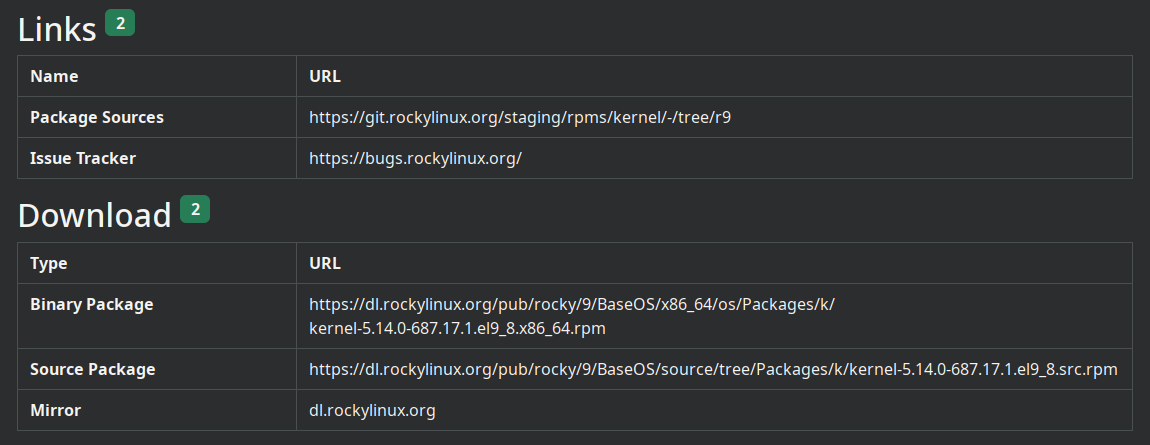 Example for kernel-5.14.0-687.17.1.el9_8.x86_64.rpm
 -
Install kernel SRPM package
rpm -i kernel-5.14.0-687.17.1.el9_8.src.rpm -
Package sources including the tarball of kernel source code are unpacked into
~/rpmbuild/SOURCES.
Patch and build the kernel RPM
Once you have your patch file ready (which might be as easy as applying the same patch from upstream or as hard as back-porting with obscure arts), place the file in ~/rpmbuild/SOURCES . The name of the patch file has usually the form 9999-description.patch .
Jump to ~/rpmbuild/SPECS/ which contains the spec file to build the kernel RPM:
-
Update the spec file to include your patch
--- kernel.spec 2026-07-04 18:58:04.061731102 +0200 +++ kernel.spec 2026-07-04 18:53:08.555763833 +0200 @@ -959,6 +959,7 @@ # empty final patch to facilitate testing of kernel patches Patch999999: linux-kernel-test.patch Patch1000000: 1000-debrand-some-messages.patch +Patch9000000: 9000-fix-cve-0000-00000.patch # END OF PATCH DEFINITIONS @@ -1663,6 +1664,7 @@ ApplyOptionalPatch linux-kernel-test.patch ApplyOptionalPatch 1000-debrand-some-messages.patch +ApplyOptionalPatch 9000-fix-cve-0000-00000.patch # END OF PATCH APPLICATIONS -
Brand the kernel: make sure it doesn’t clash with upstream. Add a custom
buildidby defining the following local in the spec file%define buildid .bx.1 -
Install the dependencies to build the RPM
sudo dnf builddep kernel-5.14.0-687.17.1.el9_8.src.rpmdnf builddepusually fails to install all required packages to build the kernel. If the following commands fail due to missing packages, install those manually withdnf install.The command
-
Rebuild the kernel
rpmbuild --define "buildid .lex.1" -bb kernel.spec |& tee kernel-build.log--with baseonlyto therpmbuildcommand to speed up the build process by skipping extra kernel variants such the real-time kernel (rt).Add the option
Once the build is complete, the new RPMS will be located in ~/rpmbuild/RPMS/x86_64/.