Sometimes it is necessary to quickly fix a package in your Linux distribution. This is usually the case for critical security vulnerabilities on packages that do not yet have an updated version available. For instance, in Handling security issues in the Linux kernel.
Package sources from distribution
The first step is to obtain the source code of the package of your distribution. In our case, this is a RedHat based distribution using the RPM package manager..
-
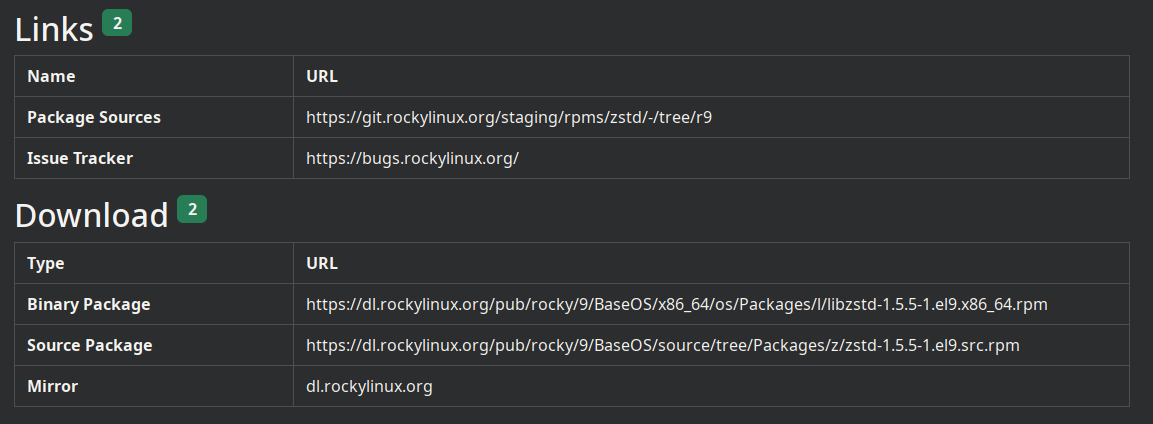
Download the source package (SRPM) of the target package. These are not typically available in the RPM repositories of the system, but can be found online. For instance, pkgs.org lists the SRPM URL for each RPM package.
Example for libzstd-1.5.5-1.el9.x86_64.rpm
-
Install the source package
rpm -i zstd-1.5.5-1.el9.src.rpm
Package sources including the tarball of the source code are unpacked into ~/rpmbuild/SOURCES.
Patch and rebuild the RPM
Once you have your patch file ready, place the file in ~/rpmbuild/SOURCES. The name of the patch file has usually the form 9999-description.patch.
Jump to ~/rpmbuild/SPECS/ which contains the spec file of your RPM:
-
Update the spec file to include your patch
--- a/zstd.spec 2026-07-14 11:08:29.735529525 +0200 +++ b/zstd.spec 2026-07-14 11:09:40.563386922 +0200 @@ -26,6 +26,7 @@ Source0: https://github.com/facebook/zstd/archive/v%{version}.tar.gz#/%{name}-%{version}.tar.gz Patch1: man-pages-1.5.7.patch +Patch9999: 9999-fix-cve-2026-00000.patch BuildRequires: cmake BuildRequires: make @@ -72,6 +73,7 @@ %setup -q find -name .gitignore -delete %patch 1 -p1 +%patch 9999 -p1 %build %if !%{with asm} -
Define a custom release version
Update the
Releasestring in the spec file with a custom one to avoid collision with the packages in your distro. Either brand it with your own custom tag or increase the release revision number.--- zstd.spec.orig 2026-07-14 11:18:25.006902972 +0200 +++ zstd.spec 2026-07-14 11:18:31.723271235 +0200 @@ -18,7 +18,7 @@ Name: zstd Version: 1.5.7 -Release: 5%{?dist} +Release: 5-1%{?dist} Summary: Zstd compression library License: BSD-3-Clause OR GPL-2.0-only -
Install the dependencies to build the RPM
sudo dnf builddep zstd-1.5.5-1.el9.src.rpmThe command
dnf builddepusually fails to install all required packages to build the RPM. If the following commands fail due to missing packages, install those manually withdnf install. -
Rebuild the RPM package
rpmbuild -bb zstd.spec |& tee rpm-build.log
Once the build is complete, the new RPMS will be located in ~/rpmbuild/RPMS/.

