The default key shortcut for KDE’s Application Launcher is the meta_ key. Also known as super_ key and which I already heavily use to move across virtual desktops and position windows. Having that launcher take possession of the meta key as a single key shortcut is very inconvenient, as that effectively removes the option to use the meta key in any other shortcut in combination with other keys.
Therefore, one of the first things I do on a new KDE system is to disable that default shortcut of the Application Launcher.
- Open System Settings
- Go to Keyboard > Shortcuts
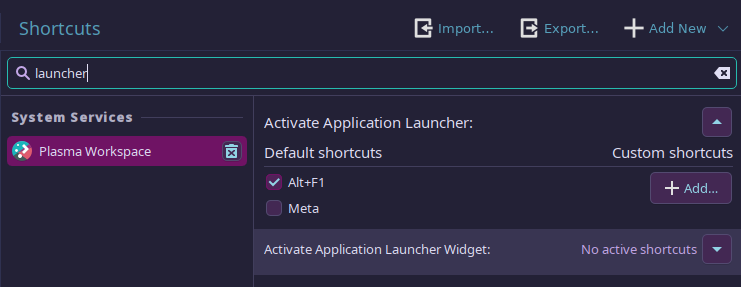
- Search for Activate Application Launcher
- Uncheck the shortcut for the Meta key
Update (20/06/2026)
Nowadays I keep all my custom KDE shortcuts on version control in a Git repo. The Shortcuts panel in System Settings has a button to Export all your shortcuts. Hence, whenever I need to configure a new system I just Import that file in that same panel (see screenshot above).

