System Image
Official images from Radxa:
- based on Debian 11 and Debian 12
- https://github.com/radxa-build/rock-4se
Armbian images:
- based on Debian 13 and Ubuntu 26.04
- community support
- https://armbian.com/boards/rock-4se
eMMC Module
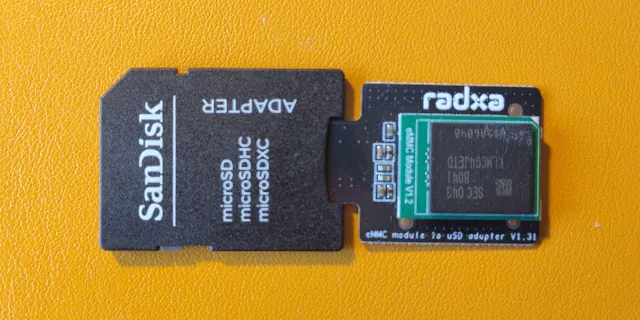
Radxa 4SE has a slot for a eMMC module that can provide better IO performance than the SD card. Installing a system image on the eMMC module is not much different than using an SD card. It just needs a special adapter (obviously), but it supports the same system image format and flashing procedure.
Warning
Do not confuse UFS with eMMC, they are different memory formats and have different requirements. UFS needs specific images with 4096 block size, while eMMC can use the generic images for SD cards with 512 block size.
Flashing the eMMC device using a Framework SD expansion card did not work:
[  740.079936] usb-storage 2-4:1.0: USB Mass Storage device detected
[  740.080044] scsi host10: usb-storage 2-4:1.0
[  741.107831] scsi 10:0:0:0: Direct-Access     Generic  MassStorageClass 0002 PQ: 0 ANSI: 6
[  741.467772] sd 10:0:0:0: [sdc] 122159104 512-byte logical blocks: (62.5 GB/58.3 GiB)
[  741.468363] sd 10:0:0:0: [sdc] Write Protect is off
[  741.468365] sd 10:0:0:0: [sdc] Mode Sense: 21 00 00 00
[  741.468936] sd 10:0:0:0: [sdc] Write cache: disabled, read cache: enabled, doesn't support DPO or FUA
[  781.724449] sd 10:0:0:0: [sdc] tag#0 UNKNOWN(0x2003) Result: hostbyte=0x00 driverbyte=DRIVER_OK cmd_age=40s
[  781.724453] sd 10:0:0:0: [sdc] tag#0 Sense Key : 0xb [current]
[  781.724454] sd 10:0:0:0: [sdc] tag#0 ASC=0x30 ASCQ=0x0
[  781.724455] sd 10:0:0:0: [sdc] tag#0 CDB: opcode=0x28 28 00 00 00 00 00 00 00 08 00
[  781.724456] I/O error, dev sdc, sector 0 op 0x0:(READ) flags 0x0 phys_seg 1 prio class 2
[  781.724459] Buffer I/O error on dev sdc, logical block 0, async page read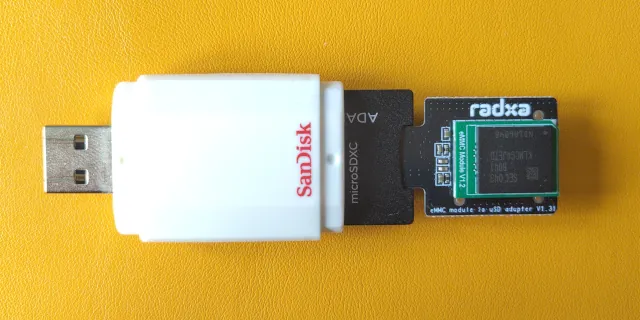
Surprisingly, a simple USB adapter from SanDisk does work:
[ 1461.581292] usb-storage 3-4:1.0: USB Mass Storage device detected
[ 1461.581378] scsi host10: usb-storage 3-4:1.0
[ 1463.472183] scsi 10:0:0:0: Direct-Access     Mass     Storage Device        PQ: 0 ANSI: 0 CCS
[ 1464.261990] sd 10:0:0:0: [sdc] 122159103 512-byte logical blocks: (62.5 GB/58.2 GiB)
[ 1464.262106] sd 10:0:0:0: [sdc] Write Protect is off
[ 1464.262108] sd 10:0:0:0: [sdc] Mode Sense: 03 00 00 00
[ 1464.262225] sd 10:0:0:0: [sdc] No Caching mode page found
[ 1464.262232] sd 10:0:0:0: [sdc] Assuming drive cache: write through
[ 1464.272608] sd 10:0:0:0: [sdc] Attached SCSI removable disk
$ dd if=/dev/sdc of=/dev/null bs=512 count=1 status=progress
1+0 records in
1+0 records out
512 bytes copied, 0.0033591 s, 152 kB/sFirst Boot
I flashed the Armbian system image onto the eMMC module. Installing the module on the Radxa 4SE board is a simple push and click of the module onto the corresponding socket.
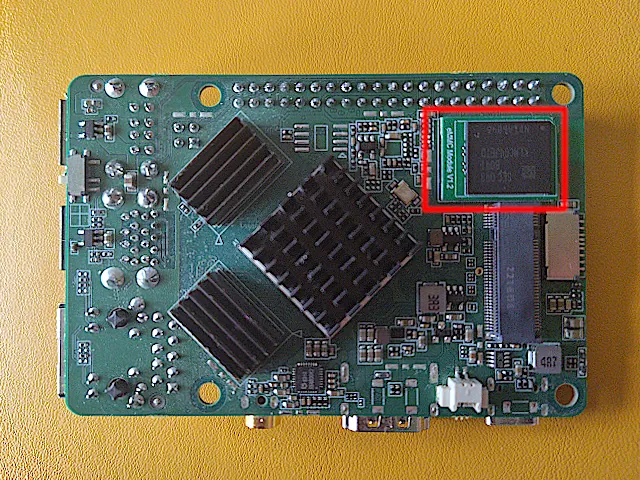
Armbian will run a setup wizard on its first run, allowing to set admin account, language and network connection. It is necessary to perform this step with a screen connected to the SBC, the board has a full-size HDMI port. I have not explored options to carry out this setup process headless, which is straightforward for Bootstrapping a headless Raspberry Pi, as I’m going to tinker a bit further with this system.

